

[PP_ADDWEATHERCONDITIONS]
Adds a new weather conditions model
Weather or ambient conditions are defined by the standard and therefore vary from country to country. Power Path supports different standards (guidelines, manuals, codes) for calculation. The standard can be defined in Settings (PP_SETTINGS). Here is an overview of dialogs for different standards.
- General
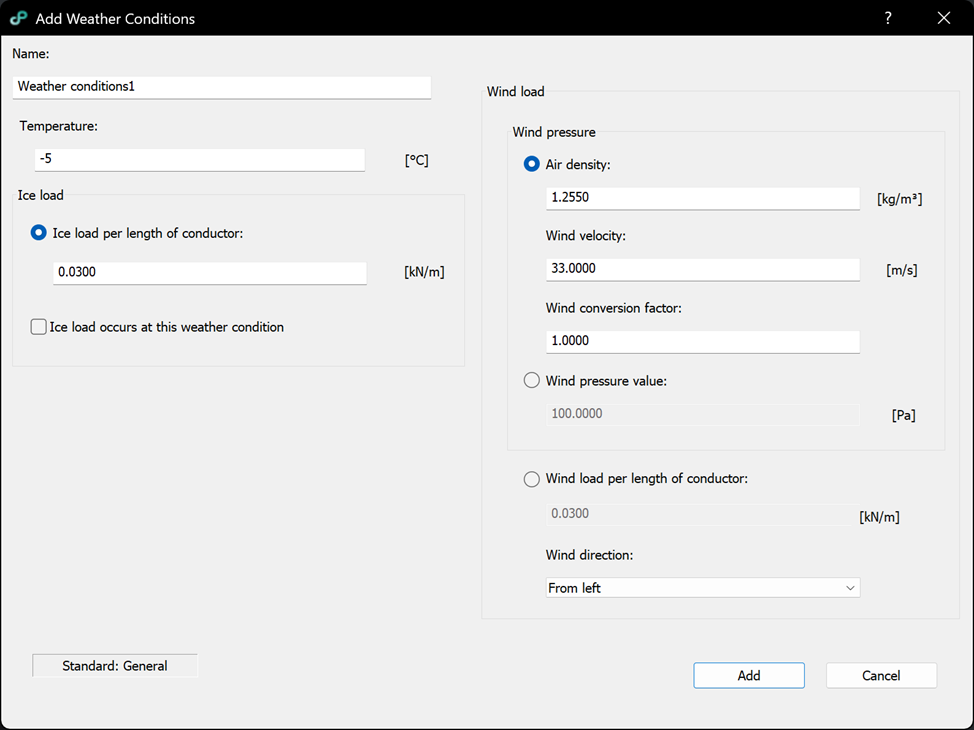
Options:
– Name: unique value.
– Temperature: value which will be used in the calculations.
– Ice coefficient: value which will be used in the calculation.
– Ice load occurs at this weather condition check: if checked conductors will be modelled with ice load.
– Air density: value used for wind pressure calculation [kg/m^3 ].
– Wind velocity: wind speed used for wind pressure calculation [m/s].
– Wind conversion factor: factor applied to the wind action (standard-dependent conversion).
– Wind pressure value: manual entry of wind pressure [Pa] (used instead of defining each parameter; air density, wind velocity, wind conversion factor).
– Wind load per length of conductor: manual entry of wind load per unit length [kN/m].
– Wind direction: direction of the wind, can be either left or right.
– Button Add: creates new weather conditions model.
– Button Cancel: cancels the command.
- Croatian (The same formulas and parameters are also used for calculations for the following countries: Bosnia and Herzegovina, Montenegro, and North Macedonia.)
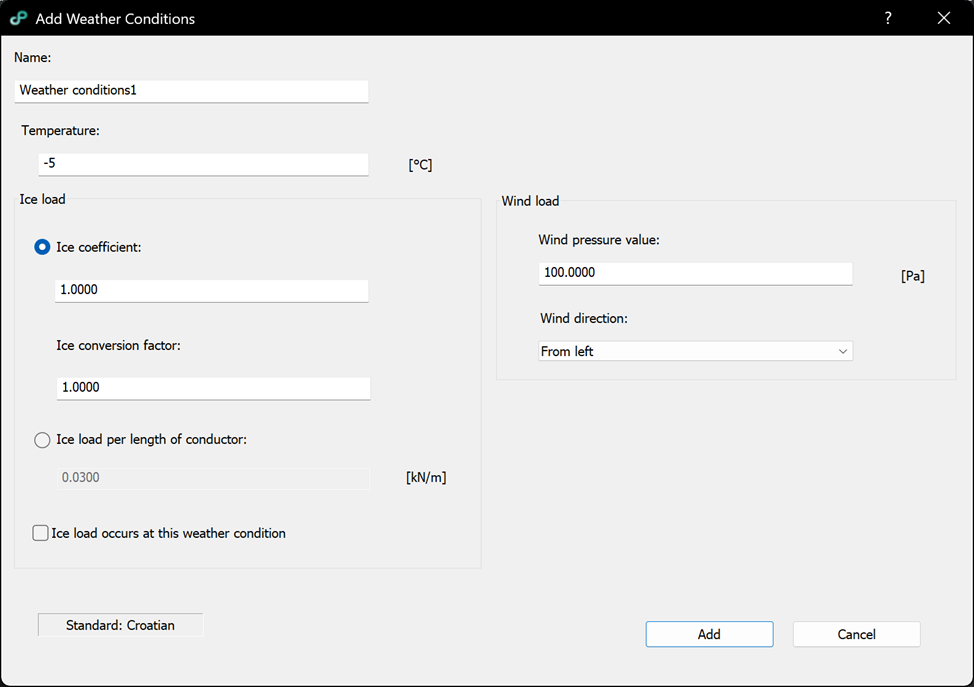
Options:
– Name: unique value.
– Temperature: value which will be used in the calculations.
– Ice coefficient: coefficient defined by the standard and used to calculate the ice load for the selected conditions.
– Ice conversion factor: factor applied to the ice action (e.g., for different return periods / design levels, depending on the standard setup).
– Ice load per length of conductor: manual entry of ice load per unit length [kN/m].
– Ice load occurs at this weather condition check: if checked, conductors will be modelled with ice.
– Wind pressure value: wind pressure used to model additional wind load [Pa].
– Wind direction: direction of the wind, can be either left or right.
– Button Add: creates new weather conditions model.
– Button Cancel: cancels the command.
- German
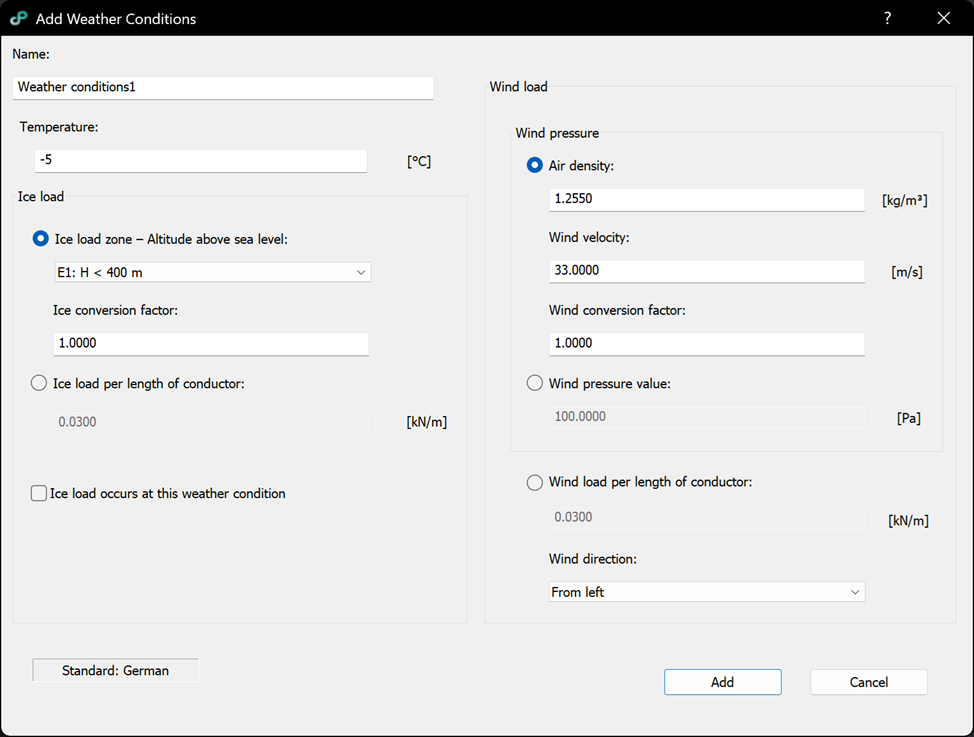
Options:
– Name: unique value.
– Temperature: value which will be used in the calculations.
– Ice load zone – Altitude above sea level: selects the ice load zone (e.g., E1: H < 400 m) according to the German standard; the selected zone is used to determine the ice load.
– Ice conversion factor: factor applied to the standard ice value (e.g., for different return periods / design levels, depending on the standard setup).
– Ice load per length of conductor: manual entry of ice load per unit length [kN/m].
– Ice load occurs at this weather condition check: if checked, conductors will be modelled with ice load.
– Air density: value used for wind pressure calculation [kg/m^3].
– Wind velocity: wind speed used for wind pressure calculation [m/s].
– Wind conversion factor: factor applied to the wind action (standard-dependent conversion).
– Wind pressure value: manual entry of wind pressure [Pa] (used instead of defining each parameter: air density, wind velocity, wind conversion factor).
– Wind load per length of conductor: manual entry of wind load per unit length [kN/m].
– Wind direction: direction of the wind, can be either left or right.
– Button Add: creates new weather conditions model.
– Button Cancel: cancels the command.
- Italian
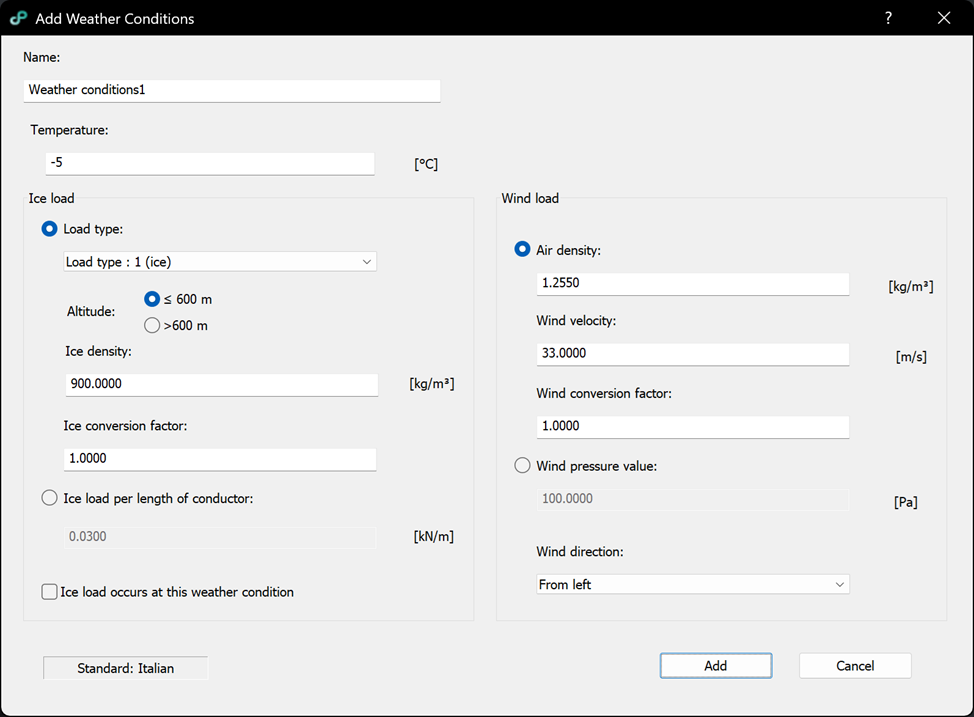
Options:
– Name: unique value.
– Temperature: value which will be used in the calculations.
– Load type: selects the Italian load type (e.g., Load type 1 – ice, Load type 2/3 – snow) which determines the characteristic ice/snow thickness according to the standard.
– Altitude: selects the altitude range used by the Italian standard (≤ 600 m or > 600 m); this affects the characteristic ice/snow thickness for the selected load type.
– Ice density: density of ice/snow used to convert the selected thickness into a line load [kg/m^3].
– Ice conversion factor: factor applied to the characteristic thickness/load (e.g., for different return periods / design levels, depending on the standard setup).
– Ice load per length of conductor: manual entry of ice load per unit length [kN/m].
– Ice load occurs at this weather condition check: if checked, conductors will be modelled with ice load.
– Air density: value used for wind pressure calculation [kg/m^3].
– Wind velocity: wind speed used for wind pressure calculation [m/s].
– Wind conversion factor: factor applied to the wind action (standard-dependent conversion).
– Wind pressure value: manual entry of wind pressure [Pa] (used instead of defining each parameter: air density, wind velocity, wind conversion factor).
– Wind direction: direction of the wind, can be either left or right.
– Button Add: creates new weather conditions model.
– Button Cancel: cancels the command.
- Norwegian
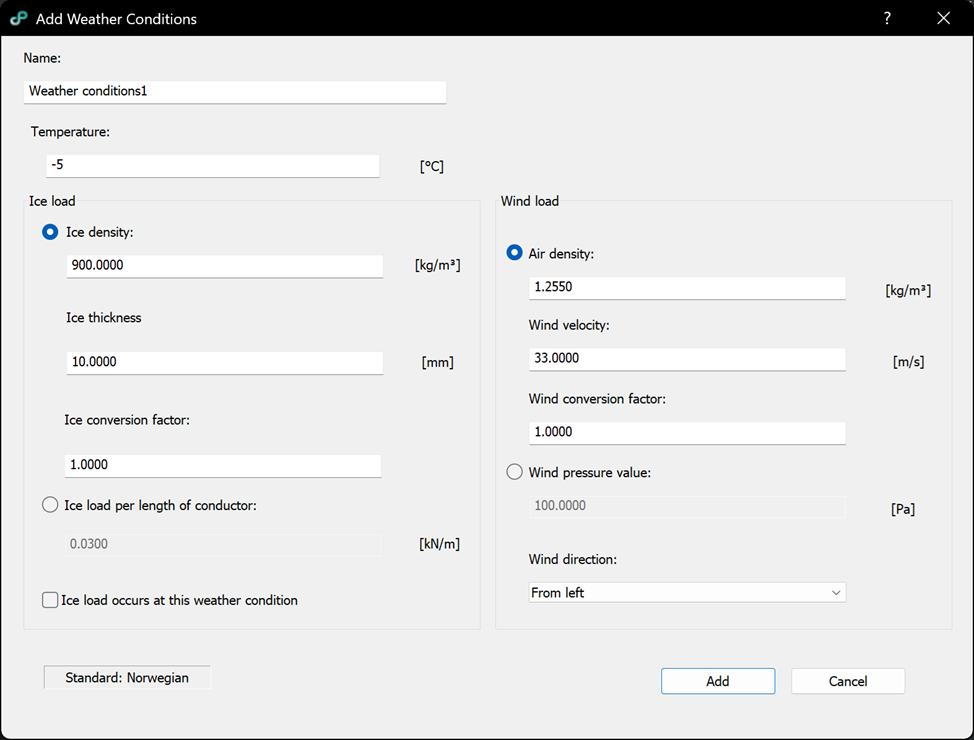
Options:
– Name: unique value.
– Temperature: value which will be used in the calculations.
– Ice density: density of ice used to convert ice thickness into a line load [kg/m^3].
– Ice thickness: ice thickness used by the Norwegian standard [mm].
– Ice conversion factor: factor applied to the ice thickness/load (e.g., for different return periods / design levels, depending on the standard setup).
– Ice load per length of conductor: manual entry of ice load per unit length [kN/m].
– Ice load occurs at this weather condition check: if checked, conductors will be modelled with ice load for this weather condition.
– Air density: value used for wind pressure calculation [kg/m^3].
– Wind velocity: wind speed used for wind pressure calculation [m/s].
– Wind conversion factor: factor applied to the wind action (standard-dependent conversion).
– Wind pressure value: manual entry of wind pressure [Pa] (used instead of defining each parameter: air density, wind velocity, wind conversion factor).
– Wind direction: direction of the wind, can be either left or right.
– Button Add: creates new weather conditions model.
– Button Cancel: cancels the command.
- Romanian
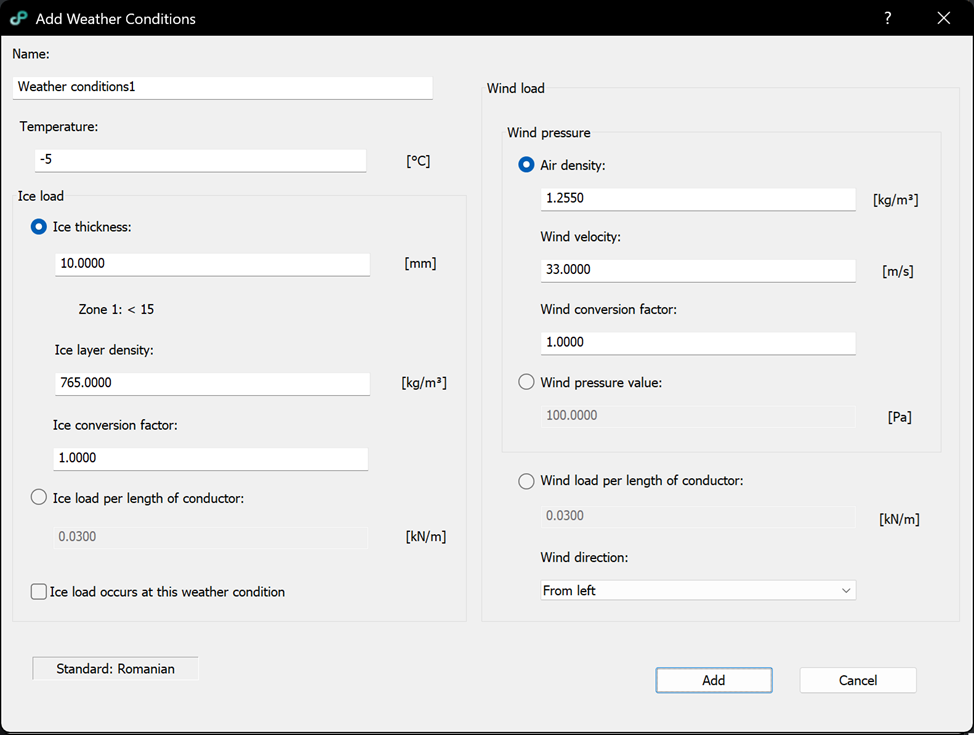
Options:
– Name: unique value.
– Temperature: value which will be used in the calculations.
– Ice thickness: ice thickness used by the Romanian standard [mm].
– Ice zone: indicates the selected Romanian ice zone (e.g., Zone 1); the zone defines the applicable ice parameters/limits for the location.
– Ice layer density: density of the ice layer used to convert ice thickness into a line load [kg/m^3].
– Ice conversion factor: factor applied to the ice thickness/load (e.g., for different return periods / design levels, depending on the standard setup).
– Ice load per length of conductor: manual entry of ice load per unit length [kN/m].
– Ice load occurs at this weather condition check: if checked, conductors will be modelled with ice load.
– Air density: value used for wind pressure calculation [kg/m^3].
– Wind velocity: wind speed used for wind pressure calculation [m/s].
– Wind conversion factor: factor applied to the wind action (standard-dependent conversion).
– Wind pressure value: manual entry of wind pressure [Pa] (used instead of defining each parameter: air density, wind velocity, wind conversion factor).
– Wind load per length of conductor: manual entry of wind load per unit length [kN/m].
– Wind direction: direction of the wind, can be either left or right.
– Button Add: creates new weather conditions model.
– Button Cancel: cancels the command.
- Serbian
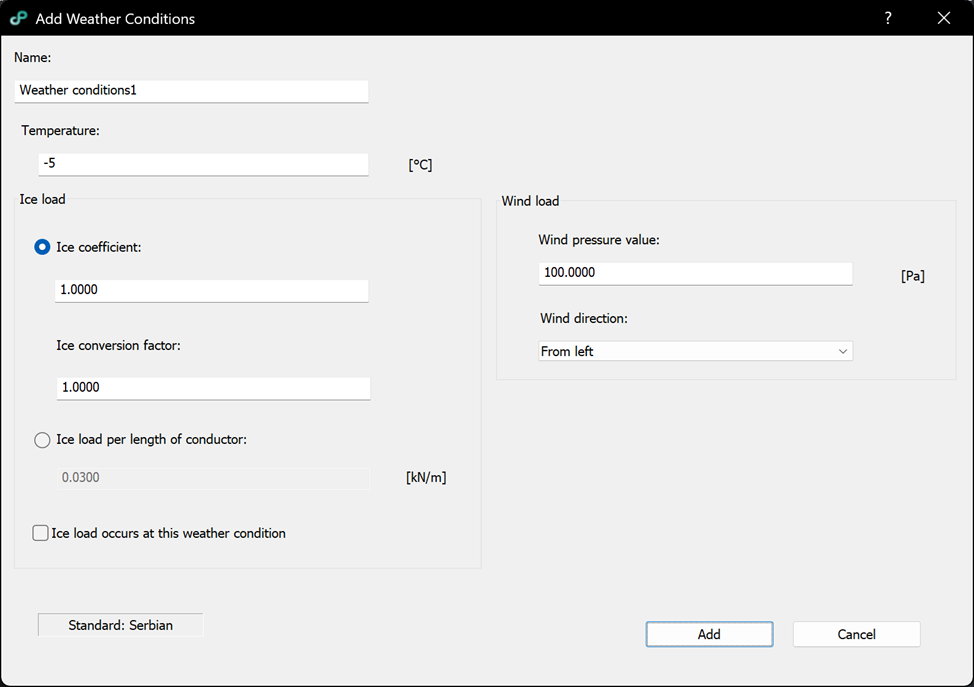
Options:
– Name: unique value.
– Temperature: value which will be used in the calculations.
– Ice coefficient: coefficient defined by the Serbian standard and used to calculate the ice load for the selected conditions.
– Ice conversion factor: factor applied to the ice action (e.g., for different return periods / design levels, depending on the standard setup).
– Ice load per length of conductor: manual entry of ice load per unit length [kN/m].
– Ice load occurs at this weather condition check: if checked, conductors will be modelled with ice load.
– Wind pressure value: wind pressure used to model additional wind load [Pa].
– Wind direction: direction of the wind, can be either left or right.
– Button Add: creates new weather conditions model.
– Button Cancel: cancels the command.
- Slovenian
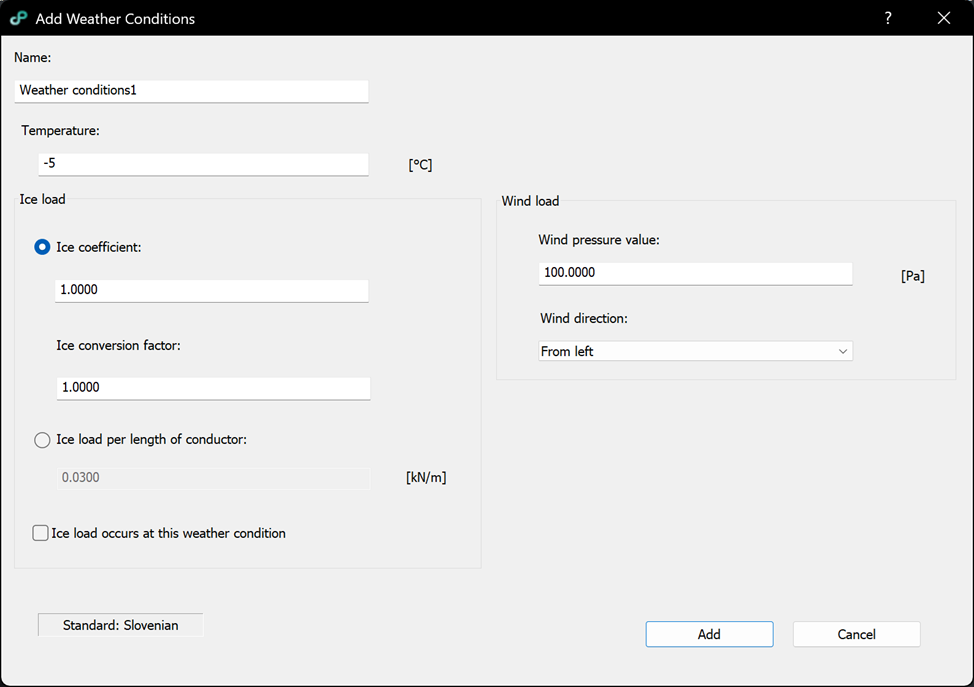
Options:
– Name: unique value.
– Temperature: value which will be used in the calculations.
– Ice coefficient: coefficient defined by the standard and used to calculate the ice load for the selected conditions.
– Ice conversion factor: factor applied to the ice action (e.g., for different return periods / design levels, depending on the standard setup).
– Ice load per length of conductor: manual entry of ice load per unit length [kN/m].
– Ice load occurs at this weather condition check: if checked, conductors will be modelled with ice load.
– Wind pressure value: wind pressure used to model additional wind load [Pa].
– Wind direction: direction of the wind, can be either left or right.
– Button Add: creates new weather conditions model.
– Button Cancel: cancels the command.
- Spanish
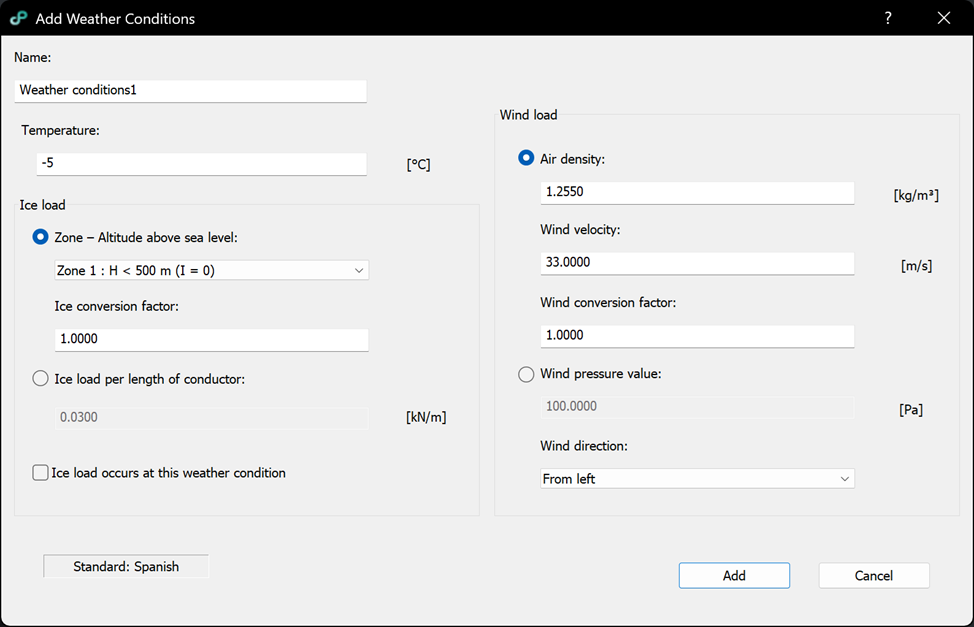
Options:
– Name: unique value.
– Temperature: value which will be used in the calculations.
– Zone – Altitude above sea level: selects the Spanish ice zone based on altitude (e.g., Zone 1: H < 500 m); the selected zone determines the applicable ice action according to the standard.
– Ice conversion factor: factor applied to the standard ice action (e.g., for different return periods / design levels, depending on the standard setup).
– Ice load per length of conductor: manual entry of ice load per unit length [kN/m].
– Ice load occurs at this weather condition check: if checked, conductors will be modelled with ice load.
– Air density: value used for wind pressure calculation [kg/m^3].
– Wind velocity: wind speed used for wind pressure calculation [m/s].
– Wind conversion factor: factor applied to the wind action (standard-dependent conversion).
– Wind pressure value: manual entry of wind pressure [Pa] (used instead of defining each parameter: air density, wind velocity, wind conversion factor).
– Wind direction: direction of the wind, can be either left or right.
– Button Add: creates new weather conditions model.
– Button Cancel: cancels the command.
- Swedish
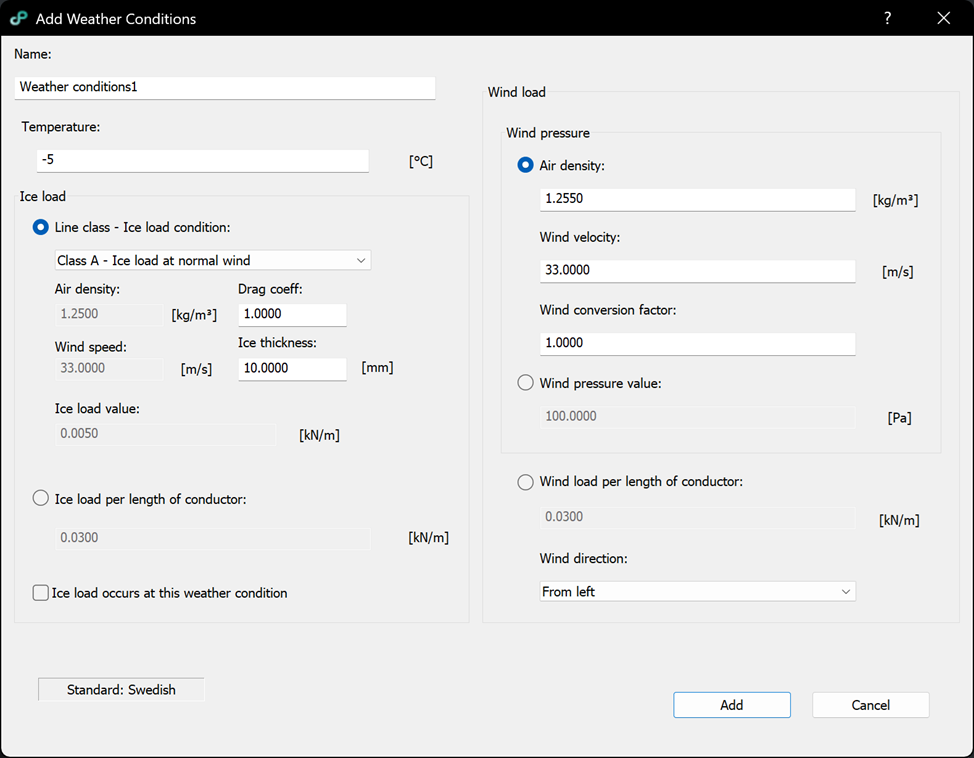
Options:
– Name: unique value.
– Temperature: value which will be used in the calculations.
– Line class – Ice load condition: selects the Swedish line class / ice-load condition (e.g., Class A / Class B – ice load at normal or no wind); the selected class defines the standard ice/wind parameters used to determine the ice load.
– Air density (ice condition): air density used within the selected ice-load condition [kg/m^3].
– Wind speed (ice condition): wind speed used within the selected ice-load condition [m/s].
– Drag coefficient: aerodynamic drag coefficient used for calculating the load under the selected condition.
– Ice thickness: ice thickness used for calculating the ice load [mm].
– Ice load value: calculated ice line load for the selected class/parameters [kN/m].
– Ice load per length of conductor: manual entry of ice load per unit length [kN/m].
– Ice load occurs at this weather condition check: if checked, conductors will be modelled with ice load.
– Air density: value used for wind pressure calculation [kg/m^3].
– Wind velocity: wind speed used for wind pressure calculation [m/s].
– Wind conversion factor: factor applied to the wind action (standard-dependent conversion).
– Wind pressure value: manual entry of wind pressure [Pa] (used instead of defining each parameter: air density, wind velocity, wind conversion factor).
– Wind load per length of conductor: manual entry of wind load per unit length [kN/m].
– Wind direction: direction of the wind, can be either left or right.
– Button Add: creates new weather conditions model.
– Button Cancel: cancels the command.
For a detailed explanation and review of the calculation formulas for each standard, see the Formulas and Equations article.
Watch video tutorial to see how the command works